
We've made it easy for you to remind your
members to update their profile, and for
members to access editing their profile.
1. Admin Control Panel > COMMUNICATION > click SEND EMAIL.
2.
Complete SENDER and RECIPIENTS sections.

TIP : To send to specific members use
RECIPIENTS > select by >
click Directory individually.

Click + to expand SELECT
RECIPIENTS section to view entire
membership and select
individuals.

3. SUBJECT
> enter subject line.

4. MESSAGE
> select an insert > click Profile Update Reminder.

5. Click INSERT.

6. MESSAGE
> Profile Update Reminder
inserted.
NOTE: Your logo is inserted at the
top. VIEW PROFILE button takes recipient
to their profile page directly if they've
checked REMEMBER ME previously. Otherwise
they must login first.
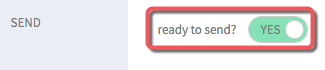
7. SEND > ready to send? >
click toggle switch to YES.
8. Click SEND EMAIL.
